

How do I transfer my shares or ISAs from another broker to IG?
Transferring from a UK-based broker to IG
If you have an active IG share dealing or ISA account, you can request to transfer your personal shares or ISAs to IG from another UK-based broker.
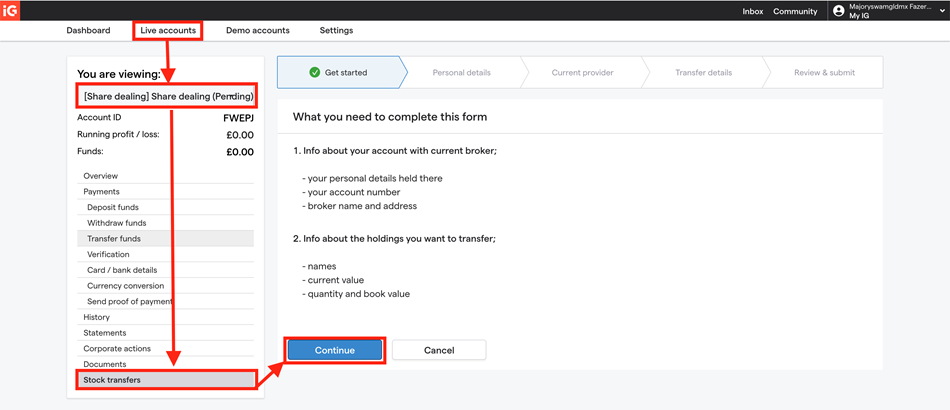
Simply open the 'live accounts' section in your My IG dashboard and follow the steps below:
- Using a web browser, log in to your My IG dashboard
- Navigate to the 'live accounts' tab
- From the drop-down menu, choose the share dealing or ISA account you wish to transfer to
- Select 'stock transfers' (for share dealing) or 'ISA transfers' (for ISAs)
- Click on 'start request now' and follow the on-screen prompts
- Review and submit your transfer using your e-signature. A Docusign pop-up will open where you can sign electronically.
Once you click 'Finish', your signed application will be automatically submitted to our transfers team.
| Important: The MyIG route applies only to UK-based broker transfers. If you are transferring from a broker outside the UK, please refer to the section below. |
A note on signature requirements: Electronic signatures are accepted where supported by the specific transfer process. Where a wet signature is required, this will be stated clearly within the relevant section. |
Transferring from a broker based outside of the UK to IG
If you are transferring investments from a broker outside the UK, you cannot use the MyIG ‘stock transfers’ route. The transfer must be initiated externally, as outlined below.
Europe-based or US-based brokers to IG (Broker-to-broker transfers)
You must contact your current broker to initiate the transfer.
- You cannot start this transfer through MyIG
- Instruct your current broker to begin the outbound transfer
- Your broker will request IG’s settlement details and contact our transfers team directly
This is because IG cannot initiate the retrieval of these assets — the transfer must be initiated by the originating broker on your behalf.
Expected timeline: 14–25 working days (approximately 2–4 weeks) |
US DRS (Direct Registration System) transfers
DRS transfers follow a separate process from standard broker-to-broker transfers.
To submit a DRS transfer to IG, please email giatransfers@ig.com with:
- Your IG account number
- Full name as registered on your account
- Current residential address
- Stock name and ticker symbol
- Number of shares to transfer
- Receiving registry name
- Receiving account number
Expected timeline: 2–3 working days |
Australia-based broker to IG
Transfers from Australian brokers follow a specific process due to Australia’s HIN/SRN holding structures.
Steps:
- Download the Australian issuer-sponsored transfer form
- Complete the form with all required details
- Sign the form with a wet signature (electronic signatures are not accepted)
- Email the signed form to giatransfers@ig.com
Our transfers team will review your form and provide further instructions for processing.
Expected timeline: 14–25 working days (approximately 2–4 weeks) |
Once a transfer is completed Once a transfer has been completed and settled, it cannot be reversed. If you need to cancel a transfer that is still in progress, please contact giatransfers@ig.com immediately with:
|
How long will my transfer take?
Transfer timelines vary depending on the type of transfer:
Transfer Type | Expected Timeline |
Standard UK transfers (CREST) | 14 working days (approximately 2–3 weeks) |
International transfers (EU/US) | 14–25 working days (approximately 2–4 weeks) |
Australian transfers | 14–25 working days (approximately 2–4 weeks) |
DRS transfers | 2–3 working days |
Internal IG account transfers | 1–2 working days |
Transfers may take longer if:
- Documentation submitted is incomplete
- The sending broker is slow to respond
- Corporate actions are pending on the shares being transferred
- Additional compliance or AML checks are required
Frequently Asked Questions
Have you received my transfer form? / Checking transfer status
Why hasn't my transferred cash been credited to my account yet?
- Settlement is still pending at the sending broker
- Transfer reference information is missing or incorrect
- Additional verification checks are required
My shares left my old broker but haven't arrived at IG yet. Where are they?
My cash transferred but my shares haven't. Why?
- Cash transfers: Typically settle within 14 working days
- Securities transfers: Can take up to 25 calendar days
Can I transfer shares from a joint account to my individual IG account?
- Joint accounts can only transfer to joint accounts
- Individual accounts can only transfer to individual accounts
Can I transfer shares from a delisted company into my IG account?
Can I transfer during a corporate action?
- Tender offers
- Rights issues
- Mergers and acquisitions
- Other material corporate actions
Can I trade shares while a transfer is in progress?
- Change the quantity being transferred
- Cause delays in processing
- Result in transfer failures or rejections
Will my book cost transfer with my shares?
- If the sending broker includes book cost data with the transfer, IG will update your records accordingly
- Book cost transfer is not automatic — you may need to request this specifically from your old broker
- If book cost information isn't provided, you'll need to manually provide your purchase details for CGT purposes
How do I transfer employee shares to my ISA?
- Contact your employer's share plan broker or registry first
- They will send a transfer request to IG with an HMRC-approved Letter of Authority (LOA)
- Once received, our team will process the request through isastocktransfers@ig.com
Can I transfer from multiple ISAs into one IG ISA account?
- Ensure you do not exceed the annual ISA subscription limit of £20,000 for new contributions
- Transferred amounts from previous years do not count toward your current year allowance
- Each transfer should be submitted on a separate transfer form
What if I made a mistake on my transfer form?
What is the SIPP (Self-Invested Personal Pension) transfer process?
- You initiate the request with your current SIPP administrator
- Your SIPP administrator contacts IG to execute the transfer
- IG processes the transfer once all required documentation is received
Important
|

